
Choosing the right WordPress page builder in 2026 can make or break your website’s design, speed, and overall performance.
With so many drag and drop WordPress builders available, it’s tough to know which one actually delivers the best results.
I’m breaking down the top 5 page builders that truly stand out in 2026 — from the power of WordPress.com’s native editor to the advanced flexibility of Oxygen.
Whether you’re a beginner or a pro, this post will help you pick the perfect builder for your next project.

Table of Contents
- 5 Best WordPress Page Builders (2026) at a Glance
- How the Top 5 WordPress Page Builders (2026) Stack Up (Quick Comparison)
- 1. WordPress.com Block Editor (Best for Speed, Simplicity & Zero-Maintenance)
- 2. Elementor (Best for Designers, Freelancers & Flexibility)
- 3. Divi (Best for Designers & All-in-One Visual Editing)
- 4. SeedProd (Best for Landing Pages & Lightweight Builds)
- 5. Oxygen Builder (Best for Developers & Performance-Focused Builds)
- FAQs
- Conclusion: Choosing the Right WordPress Page Builder in 2026
5 Best WordPress Page Builders (2026) at a Glance
A quick snapshot of the top builders before we dive into detailed comparisons.
1
WordPress.com

Best for beginners with fast, no-plugin site building.
2
Elementor

Best for design flexibility & drag-and-drop control.
3
Divi

Best for all-in-one design system + lifetime value.
4
Seedprod

Best for landing pages, funnels & marketing pages.
5
Oxygen Builder

Best for developers & performance-focused builds.
How the Top 5 WordPress Page Builders (2026) Stack Up (Quick Comparison)
The table below shows how each builder performs in key areas like design flexibility, speed, and usability.
| Page Builder | Best Fit For | Ease of Use | Speed / Performance | Pricing | Overall Verdict |
|---|---|---|---|---|---|
| WordPress.com Site Editor | Beginners, bloggers, business sites, fast websites | ⭐⭐⭐⭐⭐ | ⭐⭐⭐⭐⭐ | Free & Affordable plans | Best all-in-one, no-plugin builder |
| Elementor | Beginners, designers & small businesses | ⭐⭐⭐⭐ | ⭐⭐⭐ | Freemium + Pro | Most popular & feature-rich |
| Divi | Designers, visual control lovers | ⭐⭐⭐⭐ | ⭐⭐⭐ | Yearly + Lifetime | Great value + huge design power |
| SeedProd | Landing pages, funnels, marketers | ⭐⭐⭐⭐ | ⭐⭐⭐⭐ | Freemium + Pro | Best for marketing pages |
| Oxygen Builder | Developers, performance-first users | ⭐⭐⭐ | ⭐⭐⭐⭐⭐ | One-time fee | Maximum control & clean code |
Now that we’ve seen how each builder compares at a glance, let’s take a closer look at what makes each one stand out.
1. WordPress.com Block Editor (Best for Speed, Simplicity & Zero-Maintenance)

WordPress.com’s native Block Editor is a modern, block-based page builder built directly into the platform.
It combines drag-and-drop simplicity with solid design flexibility, letting you build pages and even full sites without relying on third-party plugins or complex setups.

With its clean interface, pre-designed block patterns, and page layouts, it’s an ideal choice for beginners and small businesses looking for a fast, hassle-free way to create a professional website.


While it doesn’t offer the same advanced design controls as builders like Elementor or Divi, it excels in simplicity, performance, and ease of use.
Key Features / Highlights:
- Fully visual block editor with reusable patterns
- Beautiful, curated page layouts
- Global styles for consistent design across pages
- Optimized for speed and performance without extra plugins
- Automatic updates and hosting included
Pros:
- No additional plugins required; everything is built-in
- Lightweight and fast-loading for better user experience and SEO
- Beginner-friendly with an intuitive drag-and-drop interface
- Regularly updated and secure
- Professional design patterns ready to use
Cons:
- Less flexibility than plugin-based builders like Elementor or Oxygen
- Advanced customizations may require CSS knowledge
- Some third-party integrations are limited compared to self-hosted WordPress
- Beginners and non-technical users
- Bloggers, small businesses, and personal websites
- Anyone looking for a low-maintenance, fast-loading site
- Developers or agencies that need full control over design and code
- Users building highly customized or complex dynamic sites
- Those who want to rely on third-party page builder plugins extensively
Pricing: Free tier available; paid plans starting as low as ₹112/month (billed yearly).
Related resources: <<WordPress.com Review>> | <<WordPress.com Coupon Code>>
2. Elementor (Best for Designers, Freelancers & Flexibility)
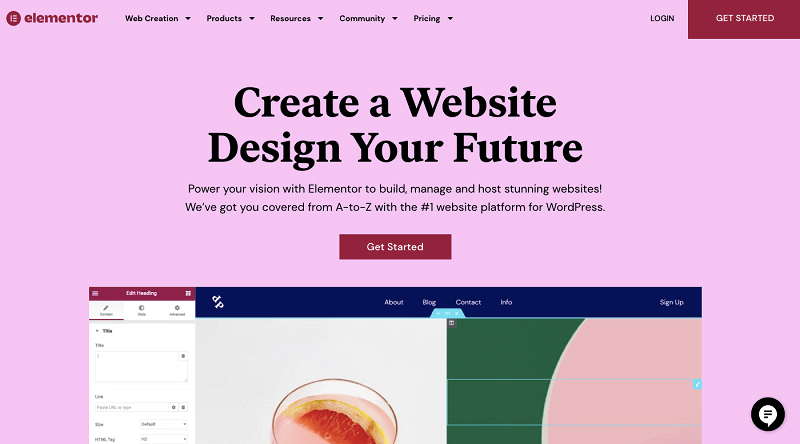
Elementor is one of the most popular WordPress page builders, known for its intuitive drag-and-drop interface and extensive template library.
It allows both beginners and experienced designers to create highly customized pages without touching a line of code.
From landing pages to full websites, Elementor provides the flexibility to design almost anything you can imagine.
Key Features / Highlights:
- Visual drag-and-drop editor with live previews
- Over 300 pre-designed templates and block patterns
- Advanced styling options, including custom fonts, animations, and gradients
- Responsive design controls for desktop, tablet, and mobile
Pros:
- Extremely flexible with near-limitless design possibilities
- Large library of templates and widgets to speed up design
- Supports custom CSS for advanced users
- Wide community support and frequent updates
- Works with almost any WordPress theme
Cons:
- Can be heavy on resources, potentially affecting page speed
- Some advanced features require the Pro version
- New users may feel overwhelmed by the number of options
- Designers, freelancers, and agencies who want maximum design freedom
- Bloggers and businesses building highly visual landing pages
- Users who rely on third-party plugins, add-ons, and integrations
- Those who want a builder-first approach that works with almost any theme
- Beginners who want zero setup and minimal maintenance
- Users prioritizing lightweight performance over design flexibility
- Those who prefer an all-in-one solution without multiple add-ons
Pricing: Free version available; Pro starts at $59/year for one site
Related resources: <<Elementor Pro Discount Code>>
3. Divi (Best for Designers & All-in-One Visual Editing)
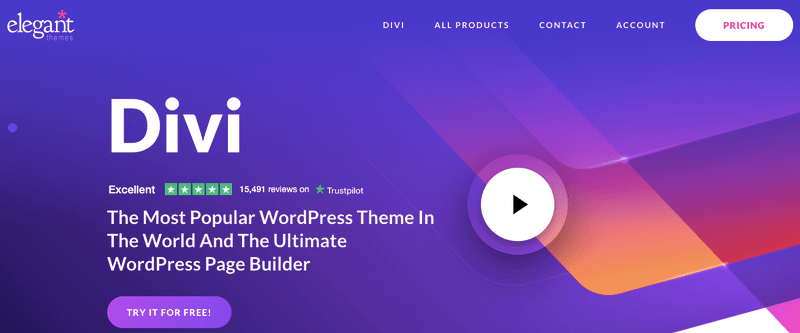
Divi is an all-in-one WordPress page builder and theme that offers complete visual editing control.
Its drag-and-drop interface and advanced design options make it a favorite among designers, agencies, and anyone looking to create visually striking websites without coding.
Divi also includes a robust template library and global design settings to maintain consistency across your site.
Key Features / Highlights:
- Visual drag-and-drop editor with inline editing
- Hundreds of pre-designed layouts and customizable modules
- Global design settings for fonts, colors, and spacing
- Split testing, animation effects, and advanced styling options
Pros:
- Combines theme and page builder in one package
- Extensive template library to speed up design
- Advanced design controls for creative freedom
- Lifetime plan option available
- Good support and a large community
Cons:
- Can be heavy, potentially affecting page speed
- Mild learning curve for beginners due to customization choices
- Some features are only available with the Divi Pro
- Designers and agencies who prefer an all-in-one ecosystem (theme + builder)
- Businesses wanting consistent branding across multiple sites
- Users who like pre-designed layout packs and global design controls
- Those managing multiple client websites under one license
- Users who want a builder completely independent of the theme
- Performance-focused users who prefer lighter, modular builders
- Beginners who want a simple, minimal editing experience
Pricing: No free version; Paid plans cost $89/year or $249 lifetime.
Related resources: <<Divi Discount Code>>
4. SeedProd (Best for Landing Pages & Lightweight Builds)

SeedProd is a lightweight WordPress page builder focused on landing pages, coming soon pages, and marketing-focused websites.
Its simple drag-and-drop interface makes it easy for beginners and marketers to create professional-looking themes, pages, and layouts quickly without any coding.
SeedProd emphasizes speed and minimalism, making it ideal for users who want a fast, optimized website without unnecessary bloat.
Key Features / Highlights:
- Drag-and-drop page builder with live preview
- Pre-designed landing page templates and blocks
- Built-in coming soon, maintenance, and 404 page options
- Responsive design for desktop, tablet, and mobile
Pros:
- Extremely lightweight and fast-loading
- Beginner-friendly with an intuitive interface
- Focused on landing pages and conversion optimization
- Built-in templates speed up page creation
- Compatible with most WordPress themes
Cons:
- Limited full-site building capabilities compared to Elementor or Divi
- Fewer advanced styling options
- Marketers, bloggers, and small businesses creating landing pages or promotional sites
- Users who want speed and minimalism without a full-page builder
- Beginners who need an easy-to-use interface
- Designers or developers needing full website design flexibility
- Users building complex, multi-page websites
- Those who want advanced animations or extensive design controls
Pricing: Free version available; Pro plans start at ~$39 – $239/year, depending on features.
5. Oxygen Builder (Best for Developers & Performance-Focused Builds)

Oxygen Builder is a developer-friendly, performance-focused WordPress page builder that offers full control over your site’s design and code.
Unlike traditional drag-and-drop builders, Oxygen allows for lightweight, clean output, making it ideal for speed-conscious websites.
It’s perfect for developers, agencies, and advanced users who want precise control without unnecessary bloat.
Key Features / Highlights:
- Full site builder with header, footer, and template editing
- Clean, minimal code for fast-loading pages
- Advanced styling, dynamic content, and custom code integration
- Flexible layout options with responsive design controls
Pros:
- Extremely fast and performance-optimized
- Full control over HTML, CSS, and PHP for developers
- Lightweight with minimal reliance on plugins
- Powerful dynamic content capabilities
- Excellent for building complex, custom websites
Cons:
- Steeper learning curve for beginners
- No ready-made template library as extensive as Elementor or Divi
- Not ideal for non-technical users
- Developers, agencies, and advanced users seeking full control
- Users building complex or custom-designed websites
- Anyone prioritizing website speed and clean code
- Beginners or non-technical users
- Those looking for a large pre-designed template library
- Users who prefer a simple drag-and-drop experience without coding
Pricing: No free version; One‑time license cost ~$199 (lifetime) — ideal for developers.
FAQs
Below are the quick answers to the most common questions about WordPress page builders.
A page builder is a tool that lets you design pages visually with drag-and-drop elements, so you can create layouts without coding.
Gutenberg is WordPress’s built-in block editor, ideal for simple pages, while WordPress builder plugins like Elementor, Divi, SeedProd, and Oxygen provide more drag-and-drop modules, ready-made layouts, and greater design customization.
Not necessarily — the block editor works well for basic pages, but page builders give you extra flexibility, advanced layout options, and a wider range of pre-designed templates for faster, more professional designs.
It can, if poorly optimized, but most modern builders generate clean code and have performance features to keep your site fast.
Yes, but layouts may break or need rebuilding because each builder uses its own system to structure content.
Yes — Elementor’s free version includes basic widgets and templates, while advanced features like Theme Builder require the Pro plan.
Beginners often prefer WordPress.com Site Editor or SeedProd for simplicity, while designers and developers benefit from Elementor, Divi, or Oxygen for advanced customization.
Yes — but you should still follow good SEO practices, like using optimized images, caching, and fast hosting, to get the best results.
The best free website builders include WordPress.com, Wix, Weebly, Webflow, and Carrd, each suited for different needs like blogging, design flexibility, or simple one-page sites.
Also Read:
Conclusion: Choosing the Right WordPress Page Builder in 2026
Picking the right page builder can make a huge difference in how your website looks, performs, and evolves over time.
- For beginners or those who want a fast, low-maintenance experience, WordPress.com Site Editor and SeedProd are excellent choices. They’re simple, lightweight, and allow you to get a professional-looking site live quickly.
- If you’re a designer, freelancer, or agency, Elementor and Divi offer immense flexibility, a wealth of templates, and advanced styling options. These builders let you create visually stunning websites without touching code, though they may require a bit more time to master.
- For developers or performance-focused projects, Oxygen Builder stands out with clean code, full control, and speed-optimized layouts — perfect for custom, complex websites.
Ultimately, the best page builder depends on your skill level, website goals, and design needs. Use this guide to weigh the pros, cons, and ideal users of each builder, and pick the one that aligns with your project.
No matter which builder you choose, all five options covered here are reliable, widely used, and well-supported, so you can confidently build a modern, professional WordPress website in 2026.
