
Choosing the right web hosting platform can be confusing, especially with so many options like WordPress, managed WordPress hosting, and more.
While these options may sound similar, they work quite differently in practice.
Platforms like WordPress.com and managed hosting are designed for different types of users and goals.
In this post, you’ll understand the key differences so you can choose the right option with confidence.
If you’re confused between WordPress.com and managed WordPress hosting, the short answer is: WordPress.com is easier to start, while managed hosting gives you more control and scalability.

Table of Contents
- What is WordPress.com?
- What is Managed WordPress Hosting?
- WordPress.com vs Managed WordPress Hosting (Quick Comparison)
- Key Differences Between WordPress.com and Managed WordPress Hosting
- Pricing Comparison: WordPress.com vs Managed WordPress Hosting
- Pros and Cons | WordPress.com vs Managed WordPress Hosting
- Who Should Choose WordPress.com vs Managed WordPress Hosting?
- FAQs About WordPress.com & Managed WordPress Hosting
- Final Thoughts on WordPress.com vs Managed WordPress Hosting
What is WordPress.com?
WordPress.com is a fully hosted website platform where everything is managed for you. It is built and operated by Automattic, the company behind the commercial side of WordPress.
With WordPress.com, you don’t need to worry about technical setup.
You don’t have to buy separate hosting, install software, or manage updates, security, and backups.
Everything is handled in the background, so you can focus on creating content and growing your website.
How WordPress.com Works
Instead of installing WordPress.org on a hosting provider, you simply sign up on WordPress.com and start building your site right away. The platform takes care of all the technical aspects for you.
In practice, this means:
- You can launch a website quickly
- There’s no technical learning curve
- Ongoing maintenance is minimal
Key Features of WordPress.com
- Fully managed hosting included
- Built-in security and backups
- Pre-designed themes for quick setup
- No technical setup required
- Scalable plans as your needs grow
Limitations to Consider
While WordPress.com is convenient, it still comes with some limitations:
- Customization is more limited compared to WordPress.org
- Advanced features and flexibility depend on higher-tier plans
- Less control over server-level settings and performance optimization
Who is WordPress.com Best For?
WordPress.com is a good fit for:
- Beginners starting their first website
- Personal blogs or simple projects
- Users who prefer a hands-off, managed experience
Final Take on WordPress.com
WordPress.com is a simple, all-in-one solution where everything is handled for you. However, that convenience comes with some trade-offs in flexibility and control; something to keep in mind as your website grows.
What is Managed WordPress Hosting?
Managed WordPress hosting is a type of hosting where the provider takes care of all the technical aspects of running a WordPress website, while still giving you full control over your site.
Unlike WordPress.com, this setup uses WordPress.org. This means your website is hosted on a server you control, but the hosting provider handles performance, security, and maintenance in the background.
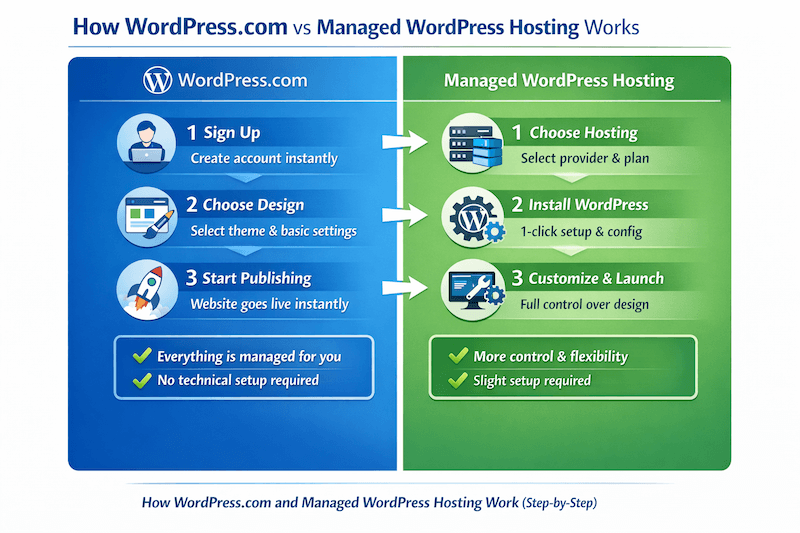
How Managed WordPress Hosting Works
With managed hosting, you start by choosing a hosting provider and setting up your website, usually with a simple one-click WordPress installation. Once your site is live, the hosting company takes care of the technical side.
This typically includes:
- Server optimization for better speed
- Security monitoring and protection
- Automatic updates
- Regular backups
In practice, you get the flexibility of WordPress without having to manage server-level tasks.
Popular Managed WordPress Hosting Providers
Some well-known managed hosting providers include:
- Kinsta
- WP Engine
- Cloudways
We’ve been using Cloudways for over 3 years, and it offers a good balance of performance, control, and ease of use for growing websites.
Key Features of Managed WordPress Hosting
- High-performance infrastructure optimized for WordPress
- Greater control over performance and server configurations
- Advanced scalability based on traffic and usage
- Developer-friendly tools and customization flexibility
- Freedom to choose the hosting environment and resources
Advantages Over Fully Hosted Platforms
Compared to WordPress.com, managed hosting offers:
- Full control over your website
- Access to all plugins and themes
- Better scalability for growing sites
- Greater customization options
Limitations to Consider
- Higher cost compared to simpler hosting options
- Slight learning curve for beginners
- You’re still responsible for managing your website content and setup
Who is Managed WordPress Hosting Best For?
Managed WordPress hosting is a good fit for:
- Bloggers planning to grow their website
- Businesses and professional websites
- Users who want performance and flexibility without handling server management
Final Take on Managed WordPress Hosting
Managed WordPress hosting offers a strong balance of performance, control, and convenience. While it costs more than basic or fully hosted platforms, it’s often the better choice for websites that are expected to grow.
WordPress.com vs Managed WordPress Hosting (Quick Comparison)
To make things clearer, here’s a quick side-by-side comparison between WordPress.com and managed WordPress hosting.
| Feature | WordPress.com | Managed WordPress Hosting |
|---|---|---|
| Setup | Fully ready to use | Requires initial setup (easy with 1-click install) |
| Hosting | Included | Purchased separately |
| Ease of Use | Very beginner-friendly | Moderate (some learning required) |
| Control | Varies by plan (moderate control) | Full control over website |
| Plugins & Themes | Available | Full access without restrictions |
| Performance | Optimized by platform | High-performance optimized servers |
| Security | Built-in and managed | Advanced security managed by host |
| Scalability | Scales via plans (some limitations) | Highly scalable with full flexibility |
| Pricing | Lower starting cost | Higher starting cost |
| Best For | Beginners, simple to mid-level sites | Growing blogs, businesses, high-traffic sites |
Key Differences Between WordPress.com and Managed WordPress Hosting
While both options help you build a website using WordPress, they work very differently in practice. The right choice depends on how much control, flexibility, and performance you need.
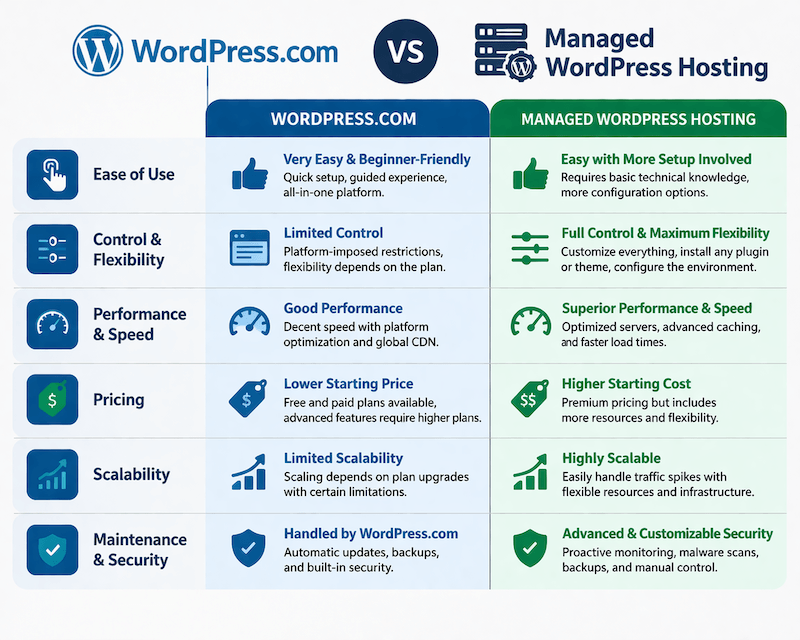
1. Ease of Use
WordPress.com is built for simplicity; you can sign up and start building your site immediately without any technical setup.
Managed WordPress hosting requires a few initial steps, like choosing a provider and setting up your website. That said, most platforms offer one-click installs and guided onboarding to simplify the process.
Quick takeaway:
- WordPress.com → Easier to start
- Managed hosting → Slight learning curve
2. Control and Flexibility
With WordPress.com, your level of control depends on the plan you choose. While core features are available, advanced customization and flexibility still vary across plans.
Managed hosting uses WordPress.org, which gives you full control. You can install any plugin, use custom themes, and customize your site without restrictions.
Quick takeaway:
- WordPress.com → Limited control
- Managed hosting → Full flexibility
3. Performance and Speed
WordPress.com handles performance optimization for you, which works well for most small to medium websites.
Managed hosting providers like Kinsta and WP Engine offer more advanced infrastructure, including optimized servers, caching, and CDN integration for better speed.
Quick takeaway:
- WordPress.com → Good performance
- Managed hosting → High-performance environment
4. Pricing
WordPress.com has a lower entry point, with plans starting affordably and scaling based on features.
Managed WordPress hosting comes at a higher cost due to premium infrastructure and performance-focused features.
Quick takeaway:
- WordPress.com → Budget-friendly start
- Managed hosting → Higher investment
If you’re wondering about overall costs, you can also check my guide on whether WordPress is free and the actual pricing involved.
5. Scalability
WordPress.com works well for simple websites, but scaling often means upgrading to higher plans with some limitations.
Managed hosting is built for growth. As your traffic increases, you can scale resources without major restrictions.
Quick takeaway:
- WordPress.com → Limited scalability
- Managed hosting → Highly scalable
6. Maintenance and Security
Both platforms handle maintenance and security, but in different ways.
WordPress.com is completely hands-off, managing everything automatically. Managed hosting providers also handle updates, backups, and security, but give you more control over configurations.
Quick takeaway:
- WordPress.com → Fully hands-off
- Managed hosting → Managed with flexibility
Final Thought
The core difference is simple:
- WordPress.com focuses on simplicity and convenience.
- Managed WordPress hosting focuses on control, performance, and scalability.
In most cases, the choice comes down to how much control you need and how serious you are about growing your website.
Pricing Comparison: WordPress.com vs Managed WordPress Hosting
Pricing is one of the biggest factors when choosing between WordPress.com and managed WordPress hosting, especially when you’re just starting out.
WordPress.com Pricing
WordPress.com offers multiple plans, including a free option with basic features. Paid plans start at ₹112/month, making it an affordable entry point for beginners.

When you upgrade to paid plans, you unlock features like:
- Custom domain
- Ad-free experience
- Premium themes
- Plugin access
- Advanced customization
- Developer & WooCommerce tools
Must Check <WordPress.com Coupon Code>
Managed WordPress Hosting Pricing
Managed hosting providers like Kinsta, WP Engine, and Cloudways typically start at a higher price point.
For example, Cloudways Premium plans start at $14/month.

Pricing generally depends on:
- Traffic levels
- Server resources
- Performance features
In return, you get:
- Better speed and performance
- Full control over your website
- Access to advanced tools and configurations
Regardless of the option you choose, there are some additional costs to keep in mind:
- Domain name (if not included)
- Premium themes and plugins
Which Offers Better Value?
- Choose WordPress.com if you want a low-cost, all-in-one solution to get started quickly.
- Choose managed WordPress hosting if you want long-term value, performance, and scalability.
Final Take on Pricing
WordPress.com is more affordable upfront, which makes it ideal for beginners. However, managed WordPress hosting often provides better value in the long run if you’re planning to grow your website and need more control.
Pros and Cons | WordPress.com vs Managed WordPress Hosting
To make your decision easier, here’s a quick breakdown of the advantages and limitations of both options.
WordPress.com Pros
- Easy to get started with no technical setup
- Hosting, security, and backups are included
- Beginner-friendly interface
- Lower starting cost
- Minimal ongoing maintenance
Cons
- Limited control over customization
- Advanced features require higher-tier plans
- Less flexibility for scaling complex or high-growth websites
Managed WordPress Hosting Pros
- Full control over your website
- High performance and speed optimization
- Scalable infrastructure for growth
- Advanced tools like staging, caching, and developer features
Cons
- Higher cost compared to simpler platforms
- Slight learning curve for beginners
- Requires initial setup (though simplified by most providers)
Quick Insight
- Choose WordPress.com if you want simplicity and ease of use.
- Choose managed WordPress hosting if you need control, flexibility, and long-term scalability.
Who Should Choose WordPress.com vs Managed WordPress Hosting?
Choosing between WordPress.com and managed WordPress hosting ultimately comes down to your goals, budget, and how much control you want over your website.

Choose WordPress.com If…
You should consider WordPress.com if you:
- Are just getting started with your first website
- Want a simple, all-in-one solution
- Don’t want to manage hosting, security, or updates
- Are building a personal blog or a small website
- Have a limited budget
In most cases, this option works best if your priority is ease of use over flexibility.
Choose Managed WordPress Hosting If…
Managed WordPress hosting is a better fit if you:
- Want full control over your website
- Plan to grow your blog or business
- Need access to all plugins and customization options
- Care about performance and scalability
- Are comfortable with a slightly higher investment
In practice, most growing websites eventually move toward managed hosting for better performance and control.
Simple Decision Rule
- If you want simplicity and quick setup → go with WordPress.com
- If you want control, performance, and long-term growth → choose managed WordPress hosting
FAQs About WordPress.com & Managed WordPress Hosting
Before wrapping up, here are answers to some common questions people have about WordPress.com and managed WordPress hosting.
No, WordPress.com is a fully hosted platform, while managed hosting uses WordPress.org and offers more control and flexibility.
No, hosting is included in all WordPress.com plans.
It depends. Managed hosting is better for flexibility and growth, while WordPress.com is better for simplicity and ease of use.
Yes, you can migrate your site from WordPress.com to a self-hosted WordPress setup.
It includes premium infrastructure, better performance, enhanced security, and scalability features.
Final Thoughts on WordPress.com vs Managed WordPress Hosting
Both WordPress.com and managed WordPress hosting are excellent options, but they’re built for different types of users.
If you want a simple, hassle-free way to get started without worrying about technical setup, WordPress.com is a solid choice. On the other hand, if you’re planning to grow your website and need full control, flexibility, and performance, managed WordPress hosting is the better long-term option.
In practice, many users start with WordPress.com and switch later as their needs grow. The key is to choose based on your current goals, not just what seems more powerful.
There’s no one-size-fits-all answer here—only the option that fits your website best.
