
A slow WordPress site doesn’t just frustrate visitors, it quietly limits how far your business can grow.
You can have strong content, solid SEO, and steady traffic coming in. But if your site feels slow, the real damage happens behind the scenes.
Rankings begin to slip. Visitors leave faster than they should. Conversions start declining without any clear warning.
I’ve experienced this myself. A few years ago, I had to move from shared hosting to a cloud setup because the original foundation simply couldn’t handle growth.
The truth is, most WordPress sites don’t fail because of poor ideas. They fail because of hidden performance bottlenecks that build up over time.
In 2026, you simply cannot ignore website performance. It directly impacts how far your site can scale.
In this guide, I’ll break down the most common WordPress performance issues and what you can do early to prevent them from limiting your site’s potential.

Table of Contents
- Why WordPress Performance Matters More Than Ever in 2026
- Common WordPress Performance Issues That Kill Scalability
- Why Most WordPress Sites Fail When Traffic Increases
- Early Signs Your WordPress Site Won’t Scale
- Can WordPress Actually Scale in 2026?
- What Actually Fixes WordPress Performance Issues
- FAQs About WordPress Performance Issues
- Final Thoughts
Why WordPress Performance Matters More Than Ever in 2026
In 2026, website speed is directly connected to visibility, user experience, and revenue.
It’s no longer just about publishing good content; it’s about how quickly and smoothly that content reaches your audience.
Google’s Core Web Vitals are now a standard part of ranking evaluation. These metrics focus on real user experience: how fast a page loads, how quickly users can interact with it, and how stable it feels during loading.
If your site underperforms in these areas, rankings can decline, even if the content itself is strong.
User expectations have changed as well. Most visitors expect pages to load within a couple of seconds. When they don’t, people simply move on.
That behavior affects engagement, bounce rate, and ultimately how search engines evaluate your site.
Performance also has a direct impact on conversions. Faster websites build trust and reduce friction, making it easier for users to take action.
Search engines increasingly prioritize technically reliable, fast-loading websites because their goal is simple: deliver the best possible experience to users.
In short, performance influences everything — rankings, trust, conversions, and long-term scalability.
Ignore it in 2026, and growth becomes significantly harder than it needs to be.

Common WordPress Performance Issues That Kill Scalability
Most WordPress performance problems don’t show up on day one.
They appear gradually when traffic starts increasing, content expands, and the overall system becomes heavier than it was originally designed to handle.
Here are some of the most common reasons WordPress sites struggle to scale.
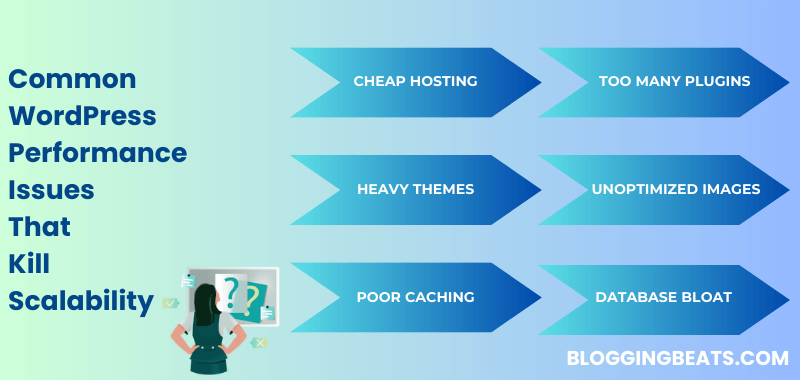
1. Cheap or Overloaded Hosting
One of the biggest mistakes site owners make is choosing web hosting based purely on price.
Shared hosting works in the beginning. It’s affordable and convenient for new websites. But the reality is that you’re sharing server resources like CPU, RAM, and bandwidth with hundreds of other sites.
If another website on the same server experiences a traffic spike, your performance can drop instantly. And you won’t even know why.
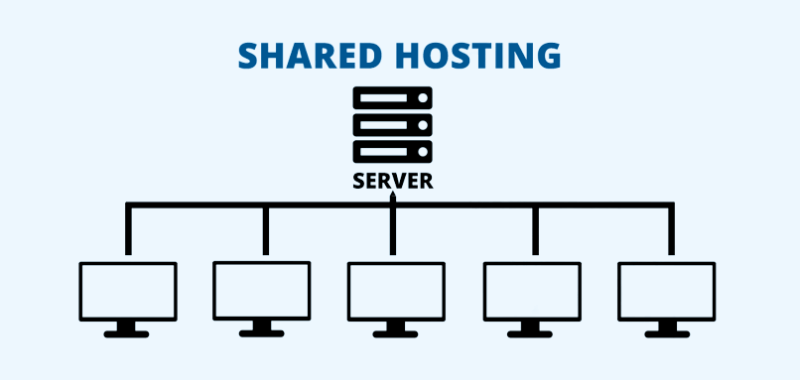
As your own traffic grows, limited resources start becoming a real constraint. You might notice;
- Slower load times during peak hours
- Occasional downtime
- 500/503 errors, or
- Warning emails about CPU limits
Some providers even throttle usage quietly. The site doesn’t go offline — it just becomes frustratingly slow.
That’s the dangerous part.
Budget hosting is fine when you’re starting out. But once growth begins, it often turns into the very bottleneck holding you back.
2. Too Many Plugins (or Poorly Coded Ones)
Plugins make WordPress flexible. But every plugin you install adds another layer of code to your site.
Some load extra CSS and JavaScript files across all pages. Others run background tasks or trigger heavy database queries on every visit. When a plugin isn’t well-optimized, the impact can be noticeable, especially as traffic grows.
Common issues of plugin overload include;
- Increased database requests
- Script conflicts
- Slower page rendering, and even a
- Laggy wp-admin dashboard
The real issue isn’t the number of plugins alone. It’s installing plugins for small features that could be handled more efficiently, or stacking multiple plugins that do similar things.
Over time, this creates unnecessary complexity and performance drag.
You don’t need zero plugins. You need the right plugins that are lightweight, actively maintained, and actually necessary.
More features may look impressive, but they rarely translate into better performance.
3. Heavy Themes and Page Builders
Modern WordPress themes can look impressive out of the box with animations, sliders, popups, and dynamic layouts.
They make a strong first impression. But that visual polish often comes with a cost.
Behind the scenes, many of these themes load large CSS and JavaScript files on every page, whether you need them or not.
Page builders make designing easier, especially for non-developers. However, each section, column, or widget typically adds extra markup, scripts, and inline styles. As pages become more complex, the codebase grows heavier.
The result?
- Larger page sizes
- Slower First Contentful Paint
- Higher Total Blocking Time
- Weaker Core Web Vitals scores overall
The site may look great visually, but as traffic increases, those extra layers start affecting speed and responsiveness.
In the long run, a lightweight theme with clean, optimized code usually performs far better than a design packed with features you rarely use.
4. Unoptimized Images and Media
Images are often the heaviest elements on a WordPress site.
Uploading high-resolution images straight from a camera or design tool without compressing them can significantly increase page size. Over time, this adds up, especially on content-heavy sites.
Many site owners also overlook basic optimizations like;
- Resizing images before upload
- Using modern formats
- Enabling lazy loading, or
- Properly generating optimized thumbnails
Video embeds can create additional strain. Multiple embedded videos on a single page increase loading time, particularly for mobile users on slower connections.
It doesn’t take much for a single page to cross several megabytes in size. And once that happens, loading speed and user experience start suffering immediately.
The good news is that media optimization isn’t complicated. But because it feels small, it’s often ignored until performance becomes a problem.
5. No Caching or Poor Caching Setup
Caching exists for one simple reason: to reduce how much work your server has to do on every visit.
Without caching, WordPress processes each request from scratch.
- It queries the database,
- runs PHP, and
- generates the page dynamically every single time someone loads it.
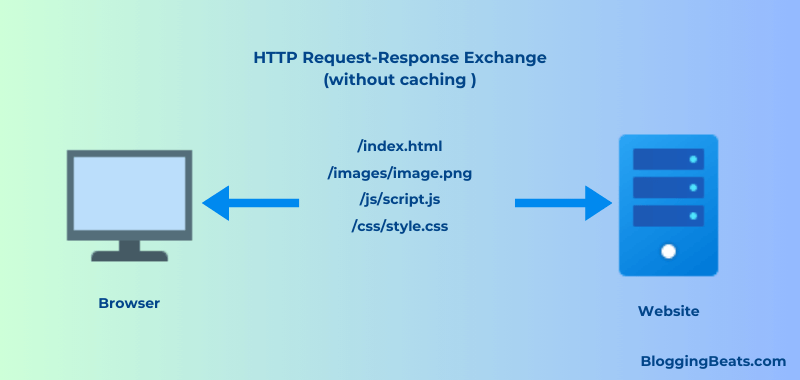
That’s manageable when traffic is low. But once visitors increase, the server starts feeling the pressure.
The problem is that many sites either don’t enable caching at all, rely on default settings without proper configuration, or depend entirely on basic hosting-level caching.
These setups may seem fine under normal conditions. But during traffic spikes, they often fail — leading to slow load times or even temporary downtime.
If you plan to scale, caching isn’t a “nice-to-have” feature. It’s a requirement.
6. Database Bloat Over Time
WordPress continuously stores data in its database. That’s normal. But over months and years, that data quietly accumulates.
Post revisions, auto-drafts, spam comments, expired transients, leftover tables from old plugins, all of it stays behind unless you deliberately clean it up.
If the database is never optimized, it gradually becomes heavier and less efficient.
- Queries take longer to execute.
- The admin dashboard starts feeling sluggish.
- Even backups grow larger and take more time to complete.
Because this buildup happens slowly, most site owners don’t notice it at first. The site still works, just not as efficiently as it could.
Regular database cleanup and optimization help keep everything running smoothly in the background.
Individually, these issues may seem minor. But when combined with weak hosting, plugin bloat, heavy themes, and poor caching, they create a setup that handles light traffic fine and struggles the moment real growth begins
Why Most WordPress Sites Fail When Traffic Increases
Most WordPress sites don’t break overnight. In fact, they often run perfectly fine at 500 or even 1,000 visits per month.
At that stage, everything feels stable. Pages load quickly, the admin dashboard responds smoothly, and there are no obvious warning signs.
The real test begins when traffic starts growing.

As monthly visits move toward 50,000 or 100,000, the weaknesses that were invisible earlier begin to surface. The same hosting plan that once felt more than sufficient starts struggling under higher concurrent usage.
Database queries increase. More users hit the server at the same time. Caching setups that worked under light traffic fail during sudden spikes.
That’s when site owners begin noticing slower load times during peak hours, random server errors, a laggy wp-admin dashboard, or upgrade recommendations from their hosting provider.
At this point, it’s easy to blame WordPress. But in most cases, the issue isn’t the platform — it’s the foundation the site was built on. It was configured to function, not necessarily to scale.
Performance issues compound quietly over time. Cheap hosting, excessive plugins, heavy themes, and database bloat might not cause immediate damage. But once traffic multiplies, those weaknesses stack together and amplify each other.
Growth doesn’t create the problem — it reveals it.
If performance isn’t addressed early, scaling your site becomes stressful instead of rewarding.
Early Signs Your WordPress Site Won’t Scale
Websites rarely fail without warning. In most cases, the signs appear early — they’re just easy to ignore.
One of the first indicators is a slow wp-admin dashboard. If editing posts, uploading media, or updating plugins starts feeling laggy, it often means your server or database is already under pressure.
Another signal is a high Time to First Byte (TTFB). When the browser waits too long before the page even begins loading, it usually points to hosting limitations or inefficient database performance.
You may also notice your PageSpeed scores gradually declining over time, even though you haven’t changed your content strategy. This often happens because plugins, scripts, and media files quietly accumulate and increase page weight.
Small traffic spikes causing visible slowdowns are another early warning. A scalable setup shouldn’t struggle the moment a post performs well.
Even frequent emails from your hosting provider recommending a plan upgrade can be a sign that your current resources are stretched.
If you’re noticing any of these now, it’s far easier to address them early than to deal with performance breakdowns after traffic grows significantly.
Can WordPress Actually Scale in 2026?
Short answer — yes, it absolutely can.
Some of the world’s largest content sites, with millions of monthly visitors, still run on WordPress. The platform itself isn’t the bottleneck. In most cases, the limitations come from how the site is configured and maintained.
WordPress is flexible enough to handle serious traffic, complex functionality, and growing content libraries. But scalability depends on the foundation it’s built on.
Poor hosting, bloated themes, excessive plugins, and weak optimization are usually the real causes behind performance breakdowns.
It’s easy to blame the platform when things slow down. It’s harder but far more effective to fix the underlying setup.
With clean code, properly configured caching, performance-focused hosting, and regular maintenance, WordPress can scale smoothly. It can support growing blogs, eCommerce stores, affiliate sites, and even high-traffic media platforms without constant crashes or slowdowns.
The difference between a struggling WordPress site and a scalable one isn’t WordPress itself. It’s the technical decisions made early.
Next, let’s look at what actually solves these performance issues.
What Actually Fixes WordPress Performance Issues
Improving WordPress performance isn’t about hacks or secret optimizations. In most cases, it comes down to getting the fundamentals right.
Here’s what truly makes a difference.
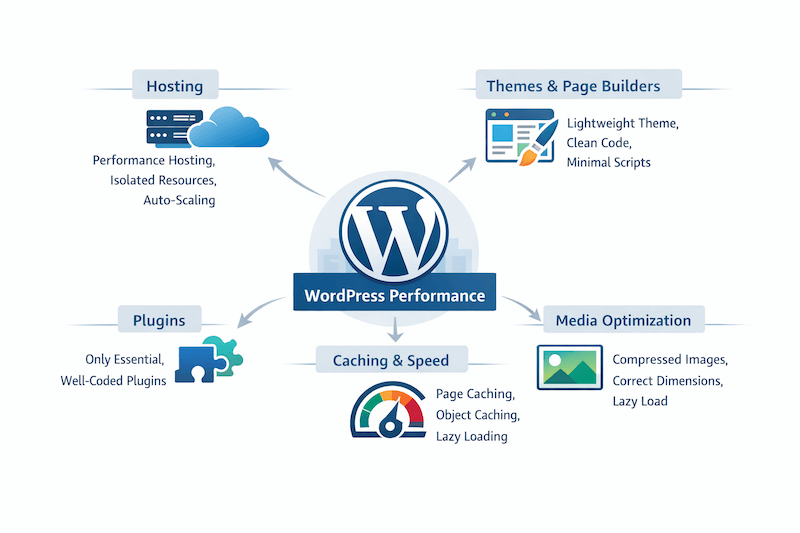
1. Lightweight Theme
Start with a lightweight, well-coded theme.
A clean theme with minimal overhead reduces page size, improves load time, and gives you more control over performance as your site grows.
When the foundation is light, everything else becomes easier to optimize.
2. Essential Plugins
Next, keep your plugin stack minimal.
Install only the plugins you genuinely need and make sure they’re actively maintained and well-coded. Remove anything outdated, redundant, or doing a job that could be handled more efficiently.
Every plugin adds overhead. Fewer plugins generally mean fewer database queries, fewer potential conflicts, and less strain on your server.
A smaller, intentional plugin stack is almost always easier to scale than a bloated one.
3. Proper Caching
Caching should be configured properly, not just enabled.
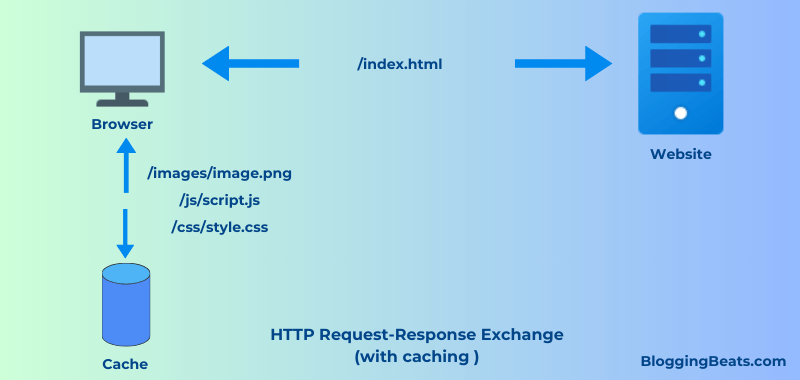
A solid setup combines page caching, object caching, and browser caching so that your server isn’t rebuilding the same content repeatedly for every visitor.
- Page caching helps by serving a pre-built version of your pages instead of rebuilding them repeatedly.
- Object caching minimizes repeated database queries.
- Browser caching allows returning visitors to load assets faster without downloading everything again.
When configured correctly, caching dramatically reduces server load and allows your site to handle higher traffic without slowing down.
It’s one of the simplest upgrades that makes a noticeable difference once traffic begins to grow.
4. Performance-focused Hosting
Fourth, choose hosting built for performance.
As traffic grows, hosting becomes one of the most important factors in overall site speed. Even a well-optimized website will struggle if the underlying infrastructure is weak.
Scalable hosting environments typically offer;
- Isolated resources (so you’re not competing with hundreds of other sites)
- Built-in caching layers, CDN integration
- Automatic scaling during traffic spikes, and
- Server configurations optimized specifically for WordPress
Instead of manually managing caching rules, security layers, and server tuning, managed platforms handle much of this at the infrastructure level.
For example, platforms like WordPress.com provide managed WordPress hosting where performance optimization, caching, security, and updates are handled behind the scenes. This reduces technical overhead and helps maintain consistent speed as traffic increases.
Must Check <<WordPress Discount Coupon>>

The real shift isn’t just upgrading to “better hosting.” It’s choosing infrastructure designed specifically for WordPress performance and long-term scalability.
When the hosting foundation is strong, everything else becomes easier to optimize.
You can explore the full managed WordPress hosting benefits in this guide.
5. Ongoing Monitoring and Maintenance
Finally, monitor your site’s performance regularly.
Clean up your database periodically, optimize images before uploading them, and test your site speed every few months. Small maintenance tasks prevent larger performance problems later.
Performance isn’t a one-time setup. It’s an ongoing process.
When hosting, caching, themes, plugins, and regular maintenance work together, WordPress becomes stable, fast, and fully capable of scaling with your growth.
FAQs About WordPress Performance Issues
Below are answers to some common questions about WordPress performance and scalability.
Most WordPress sites are slow due to cheap hosting, too many plugins, heavy themes, or unoptimized images.
There’s no fixed number, but performance issues usually start when unnecessary or poorly coded plugins increase server load.
Yes, WordPress can handle high traffic if it’s properly optimized and hosted on a scalable infrastructure.
Yes, hosting plays a major role because server resources, caching, and infrastructure directly impact load time.
Use lightweight themes, limit plugins, optimize images, enable caching, and choose performance-focused hosting.
Core Web Vitals are Google’s performance metrics that measure loading speed, interactivity, and visual stability of your WordPress site.
As traffic grows, limited server resources, inefficient database queries, and weak caching setups cause performance bottlenecks.
Also Read:
Final Thoughts
WordPress performance issues rarely appear overnight — they build up quietly over time.
Most websites fail to scale because speed and optimization are ignored until traffic starts increasing.
The good news? WordPress itself isn’t the problem. With the right technical foundation, it can handle serious traffic and support consistent growth in 2026 and beyond.
So, build performance into your site early, and scaling becomes exciting — not stressful.
This article was published in partnership with WordPress.com, though all opinions remain our own.
