
Are you confused about whether you need to purchase web hosting to build a WordPress website?
You’ve probably heard that WordPress is free, right?
So what’s the truth?
Do you actually need hosting for WordPress, or can you start a site without it?
The answer depends on how you plan to use WordPress — whether you choose WordPress.org or WordPress.com.
In this guide, I’ll break everything down in a simple way so you can clearly understand when hosting is required, when it’s not, and which option makes the most sense for you.
Let’s dive in.
Do You Need Hosting for WordPress? (Quick Answer)
Yes, you need hosting for WordPress if you use WordPress.org (self-hosted WordPress).
However, if you choose WordPress.com, hosting is already included.
In short:
- Self-hosted WordPress → Hosting required
- Hosted WordPress → Hosting handled for you

Table of Contents
- What Does Web Hosting Actually Mean?
- The Real Confusion: Two Types of WordPress
- When You Need Hosting for WordPress
- When You Don’t Need Hosting
- WordPress.com vs Self-Hosted: What Really Matters
- Types of Hosting for WordPress
- What to Look for in a Web Hosting Service?
- Best Hosting Options for Beginners & Professionals
- Common Misconceptions About Hosting
- Is Hosting Worth It?
- FAQs: Do You Need Hosting for WordPress
- Final Thoughts: Do WordPress Sites Need Web Hosting
What Does Web Hosting Actually Mean?
Before you decide, let’s simplify what web hosting really is.
Web hosting is what allows your website files to be stored on a server and accessed online by visitors.
Every website you visit is hosted somewhere.
Without hosting:
- Your website can’t go live
- Visitors can’t access it
- Your content stays offline
Think of hosting as the space where your website lives.
The Real Confusion: Two Types of WordPress
Most beginners get confused because there are two versions of WordPress: WordPress.org and WordPress.com.
This is exactly why many beginners ask, “Do you need hosting for WordPress?”
Let’s quickly understand how they differ.
WordPress.org (Self-Hosted WordPress): You Need Hosting
WordPress.org is a self-hosted version of WordPress. With it:
- You download the software
- You install it on a hosting server
- You manage your website yourself
This means you need to arrange hosting on your own.
Why Hosting Is Required Here
WordPress is just software; it needs a server to run.
Here’s what typically happens:
- You purchase hosting
- Install WordPress on that server
- Store your website files there
- Visitors access your site via the internet
Every time someone visits your website, your hosting server:
- Loads your pages
- Processes requests
- Displays your content
Without hosting, none of this works.
There is also a learning curve involved, as you’ll be managing the setup yourself. You’re responsible for maintenance and security as well.
However, the biggest advantage is control; you can fully customize your website and monetize it without restrictions.
WordPress.com: Plans Already Include Hosting
WordPress.com is a hosted platform created by Automattic, the company behind WordPress. It’s designed to make website creation simple and beginner-friendly.

With WordPress.com, you don’t need to:
- Buy hosting
- Install WordPress
- Manage servers
Everything is handled for you.
This makes it a great option if you:
- Don’t want to deal with technical setup
- Prefer a ready-to-use platform
- Just want to focus on writing or publishing
Why WordPress.com Feels Easier
Many beginners naturally lean toward WordPress.com because it takes care of:
- Hosting
- Security
- Backups
- Updates
So you can focus entirely on your content instead of technical tasks.
It’s especially useful if you:
- Are just starting out
- Want to avoid server-related work
- Prefer simplicity over full control
However, this convenience comes with trade-offs:
- Limited customization
- Less control over your website
Want to know more? Check our detailed WordPress.com hosting review here.
When You Need Hosting for WordPress
Now let’s make this practical.
You’ll need hosting if you want more control, flexibility, and room to grow.
1. You’re Building a Business Website
If you’re creating a professional website that needs:
- Custom branding
- Advanced features
- Full control
Hosting becomes essential.
2. You Plan to Scale Your Website
As your site grows, you’ll likely need:
- Better performance
- More flexibility
- Custom integrations
This level of scalability is only possible with self-hosted WordPress.
3. You Want Full Customization
With self-hosted WordPress, you can:
- Install any plugin
- Use any theme
- Customize every aspect of your site
This freedom requires hosting.
When You Don’t Need Hosting
There are also situations where you don’t need to buy hosting separately.
1. You Want a Simple, No-Tech Setup
If you don’t want to deal with:
- Server management
- WordPress installation
- Ongoing maintenance
WordPress.com is a great option.
You can simply:
- Sign up
- Choose a theme
- Start publishing right away
2. You’re Just Learning or Testing
If you’re experimenting or learning WordPress:
- You don’t need hosting yet
- You can use hosted platforms or local setups
3. You Prefer to Avoid Technical Responsibilities
This is one of the main reasons people choose WordPress.com.
It takes care of:
- Server management
- Security
- Maintenance
So you can focus only on your content.
WordPress.com vs Self-Hosted: What Really Matters
Instead of getting lost in technical details, here’s what actually matters when choosing between the two:
Control
- WordPress.org → Full control
- WordPress.com → Limited control
Ease of Use
- WordPress.org → Requires setup
- WordPress.com → Ready to use
Growth Potential
- WordPress.org → Highly scalable
- WordPress.com → Limited unless upgraded
This is the real difference, not just hosting.
Can You Switch Later?
Yes, and this is important.
Many users start with WordPress.com and later move to self-hosted WordPress as their needs grow.
This usually happens when they want:
- More flexibility
- Better monetization options
- Advanced customization
Your initial choice doesn’t lock you in forever.
Types of Hosting for WordPress
If you plan to choose self-hosted WordPress, you’ll mainly come across three types of hosting: shared, managed WordPress, and cloud hosting. Each one suits a different stage of your website.
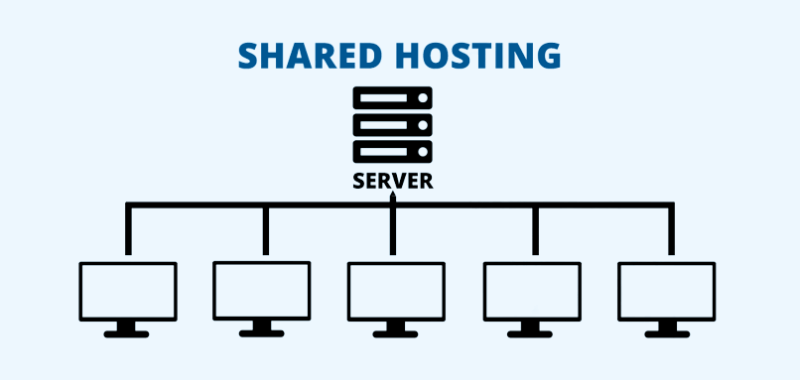
This is the most beginner-friendly option. Your website shares a server with other sites, which keeps the cost low.
Most providers offer one-click WordPress installation, so setup is easy. It’s a good choice for personal blogs or small business websites.
However, since resources are shared, your site can slow down if another site on the same server gets heavy traffic. Security can also be slightly weaker compared to other options.
2. Managed WordPress Hosting
This hosting is built specifically for WordPress. Everything is optimized, speed, security, updates, and backups are handled automatically.
You don’t have to worry about technical maintenance. It’s perfect if you want better performance and a hassle-free experience, especially as your site grows.

To learn more, check out the detailed post on managed WordPress hosting benefits.
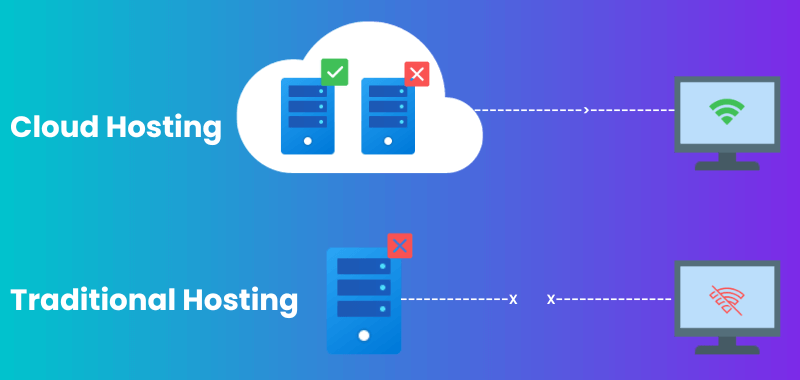
Cloud hosting uses multiple servers instead of just one. This means better uptime and reliability; if one server fails, another takes over instantly. It handles high traffic easily and offers strong security.
It’s more expensive, but ideal for larger websites, businesses, or eCommerce stores that need consistent performance.
What to Look for in a Web Hosting Service?
If you’re planning to go with a self-hosted WordPress service, choosing the right hosting matters just as much as choosing WordPress itself.
Start by understanding your needs, how much traffic you expect, what type of site you’re building, and your budget.
1. Affordability
Pick a plan you can sustain long term. Many hosts offer extras like a free domain (usually for the first year) and an SSL certificate, which helps secure your site. Just remember, renewal costs can increase later.
2. Ease of Use
Look for a hosting provider that makes setup simple. One-click WordPress installation, a clean dashboard, and guided onboarding can save you a lot of time, especially if you’re a beginner.
3. Features That Matter
Check storage and bandwidth based on your site size and traffic. Small sites don’t need huge resources, but growing sites do. Also look for features like email accounts, backups, and staging (a safe space to test changes before going live).
4. Performance
Fast loading speed and high uptime are critical. A reliable host ensures your site stays online and loads quickly, which directly impacts user experience and SEO.
5. Support & Reliability
Good customer support is essential when things go wrong. Choose a host that offers quick help and has helpful documentation.
Best Hosting Options for Beginners & Professionals
If you’re ready to go with WordPress.org, here are three reliable hosting options to consider:
Hostinger is a budget-friendly option that’s easy to get started with, making it ideal for beginners.

Bluehost is officially recommended by WordPress.org and offers a familiar cPanel-based setup, which many users find easy to manage.

Cloudways focuses on performance and is better suited for growing websites that need more speed and flexibility.
Start simple; you can always upgrade as your website grows.
Common Misconceptions About Hosting
Let’s clear a few common myths that often confuse beginners.
One common belief is that “hosting is optional,” which is not true if you’re using WordPress.org.
Another misconception is that “all hosting is the same,” but in reality, performance, reliability, and support can vary significantly between providers.
Many people also assume that “the cheapest hosting is the best,” which can lead to slow speeds and issues as your website grows.
Understanding these early can help you avoid costly mistakes later.
Is Hosting Worth It?
If you’re building something serious, then yes, hosting is absolutely worth it.
It gives you full ownership, greater flexibility, and the ability to scale your website as it grows.
Without hosting, your options remain limited, especially when it comes to control and long-term growth.
FAQs: Do You Need Hosting for WordPress
Now that you have a clear understanding of how hosting fits into WordPress, here are answers to some common questions.
Yes, WordPress.com offers a free plan, but it comes with limitations such as ads and a branded domain.
It’s a great option for beginners who want a simple, no-maintenance setup without dealing with technical hosting tasks.
Yes, if you use WordPress.org, you’ll need separate hosting to make your website live.
The best option depends on your needs, but for most beginners, managed WordPress hosting or reliable shared hosting works well. Popular choices include Hostinger, Bluehost, and Cloudways.
Shared hosting is usually the most affordable way to get started. Hostinger is often a strong budget-friendly option.
No, you don’t have to use WordPress-specific hosting. You can use shared or cloud hosting, although WordPress hosting makes setup easier.
Also Read:
Final Thoughts: Do WordPress Sites Need Web Hosting
So, do you need hosting for WordPress?
- Yes—if you want full control and long-term growth.
- No—if you prefer a simple, managed setup.
The right choice ultimately depends on your goals.
If you value simplicity, you can start with WordPress.com and upgrade later as your needs grow.
If you’re aiming for flexibility and scalability, it’s better to choose a reliable hosting provider and go with WordPress.org.
