
When I first thought of starting a blog back in 2019, WordPress was the platform I kept coming across—and for good reason. Today, it powers more than 40% of all websites on the internet.
But what exactly is WordPress, and how does it actually work?
For beginners, it can feel confusing. Some people call it a website builder, others say it’s a CMS, and many assume you need coding skills to use it.
The reality is much simpler.
WordPress is a tool that lets you build and manage a website without writing code. And once you understand how it works behind the scenes, everything starts to make sense.
In this guide, you’ll learn:
- What WordPress is (in simple terms)
- How WordPress works step by step
- What makes it different from other platforms
- How you can use it to build your own website

This article was published in partnership with WordPress.com, though all opinions remain our own.
Table of Contents
- What Is WordPress, Really?
- The Two Versions of WordPress
- Why Is WordPress So Popular? Why Should You Use It?
- How Does WordPress Work? (Step-by-Step Explanation)
- Understanding WordPress Core Components
- What Happens When Someone Visits Your Website?
- Real-Life Example (How It Works Practically)
- Posts vs Pages: How Content Works
- Gutenberg Editor (Block System)
- How WordPress Handles Design Without Coding
- How Plugins Extend WordPress Power
- WordPress vs Website Builders
- Common Mistakes Beginners Make
- Performance & Speed Optimization
- How WordPress Manages SEO
- WordPress Security: How It Stays Safe
- How Updates Work
- Use Cases of WordPress
- How WordPress Makes Money (For You)
- Common Misconceptions About WordPress
- FAQs About How WordPress Works
- Quick Summary (How WordPress Works)
- Final Thoughts
What Is WordPress, Really?
WordPress is software that uses a database, themes, and plugins to create and display web pages dynamically when someone visits your website.
At its core, WordPress is a content management system (CMS). This means it allows you to create, manage, and publish content, like blog posts, pages, and media, without needing to write code from scratch.
Behind the scenes, WordPress is built primarily using PHP and works with a database (usually MySQL) to store your content. When someone visits your site, WordPress fetches that data and displays it using your selected theme.
Instead of building a website manually with HTML, CSS, and PHP, WordPress gives you a ready-made system where you can:
- Add content
- Customize design
- Install features
Think of it like this:
- WordPress = Engine
- Theme = Design
- Plugins = Extra features
The Two Versions of WordPress
Before understanding how WordPress works, it’s important to know that there are two versions of WordPress and choosing the right one makes a big difference.
1. WordPress.org (Self-Hosted)
- You download the WordPress software
- You install it on your own hosting server
- You get full control over your website

Best for bloggers, businesses, and long-term website owners who want flexibility and ownership.
2. WordPress.com (Hosted)
- Everything is managed for you
- No need to handle hosting or technical setup
- Limited control unless you upgrade

Best for beginners who want a quick and simple start.
Key Difference (Quick Summary)
The main difference is control.
- WordPress.org → Full ownership, flexibility, and scalability
- WordPress.com → Easier setup, but limited customization
To make the right choice, see this detailed guide on WordPress.com vs WordPress.org.
Why Is WordPress So Popular? Why Should You Use It?
WordPress has become the go-to platform for millions of website owners, and for good reason.
One of the biggest factors behind its popularity is its massive adoption. Powering over 40% of all websites on the internet, WordPress has built a strong reputation as a reliable and trusted platform.
Another key advantage is that WordPress is both beginner-friendly and highly customizable. Even if you have no technical experience, you can easily create and manage a website. At the same time, advanced users can customize almost every aspect of their site, making it suitable for all skill levels.
WordPress is also free and open-source, which means you have full ownership of your website. You’re not locked into a single provider and can migrate your site to any hosting platform whenever needed.
In addition, it offers a massive ecosystem of themes and plugins, allowing you to build almost any type of website, from blogs to business sites to online stores.
Another major strength is scalability. You can start with a simple blog and grow it into a full-featured business site or even an online store using tools like WooCommerce.
Finally, WordPress is SEO-friendly by design, with clean URLs, fast performance (when optimized), and powerful plugins that help improve your search engine rankings.
How Does WordPress Work? (Step-by-Step Explanation)
Now that you understand what WordPress is, let’s break down how it actually works behind the scenes.
1. Domain + Hosting = Your Website Foundation
To make WordPress work online, you need two things:
- Domain name → Your website address (e.g., yoursite.com)
- Web hosting → A server where your website files are stored
Popular hosting providers include:
Once you purchase hosting, you can install WordPress with just one click. Most providers handle the technical setup automatically.
If you’re unsure whether hosting is required, check out this guide on whether you need hosting for WordPress.
When I started, this was the part that confused me the most, but once you set it up, it becomes surprisingly simple.
2. WordPress Gets Installed on Your Server
After installation:
- WordPress files are stored on your hosting server
- A database (usually MySQL) is created
- Your website becomes accessible via your domain
You can now log in to your dashboard: yoursite.com/wp-admin
This is where you manage everything related to your website.
3. The Dashboard (Your Control Panel)
The dashboard is the backend of your website.
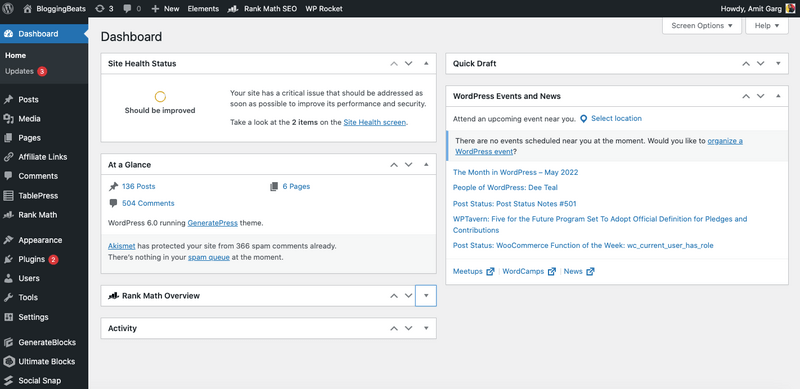
From here, you can:
Even if you’ve never built a website before, the dashboard is designed to be simple and beginner-friendly.
Understanding WordPress Core Components
To truly understand how WordPress works, you need to know its four main components:
1. Themes (Design Layer)
Themes control how your website looks.
With a theme, you can:
- Change layout
- Customize colors
- Adjust fonts
- Control page structure
Common WordPress themes include Astra, GeneratePress, and Kadence.
A good theme not only makes your site look professional but also helps improve loading speed and user experience.
2. Plugins (Functionality Layer)
Plugins add features to your website without requiring any coding.
Examples include:
Think of plugins as “apps” that extend your website’s functionality and allow you to add new features as needed.
It’s tempting to install too many plugins at first (I made the same mistake), but keeping your setup minimal usually works better for performance and stability.
3. Database (Where Content Lives)
WordPress stores all your content in a database, including:
- Posts
- Pages
- Comments
- Settings
Whenever someone visits your site, WordPress retrieves this data and displays it dynamically using your theme.
4. Core Files (The Engine)
Core files are the main WordPress files that power everything behind the scenes.
They:
- Connect the database and frontend
- Process user requests
- Generate pages dynamically
You usually don’t interact with these files directly, but they are essential for how WordPress functions.
In simple terms, WordPress works by combining themes (design), plugins (features), and a database (content) to generate your website dynamically.
What Happens When Someone Visits Your Website?
Here’s what happens behind the scenes in real-time when someone visits your site:
1. A user types your domain name
2. The request is sent to your hosting server
3. WordPress processes the request
4. It retrieves content from the database
5. Applies your theme design
6. Displays the final webpage in the browser
This entire process happens in just a few milliseconds.
Simple Flow (Quick Understanding)
User → Server → WordPress → Database → Theme → Final Page
Real-Life Example (How It Works Practically)
Let’s say you publish a blog post.
- You write the content in WordPress
- It gets stored in the database
- A visitor clicks your blog link
- WordPress fetches that content
- Your theme formats it into a proper layout
- The page loads on the visitor’s screen
You didn’t write any code, but a complete webpage was generated instantly.
That’s the power of WordPress.
This dynamic process is what makes WordPress flexible and powerful compared to static websites.
Posts vs Pages: How Content Works
In WordPress, there are two main types of content: posts and pages.
Posts
- Used for blog content
- Organized using categories and tags
- Displayed in reverse chronological order
- Updated regularly
Pages
- Used for static content
- Not organized by categories or tags
- Examples: About, Contact, Privacy Policy
Understanding the difference helps you structure your website properly from the start.
Gutenberg Editor (Block System)
WordPress uses a modern block-based editor called Gutenberg.

Each piece of content is created using blocks, such as:
- Paragraph
- Image
- Button
- Video
This makes content creation more visual and flexible, especially for beginners.
How WordPress Handles Design Without Coding
One of the biggest advantages of WordPress is that you don’t need coding skills to design your website.

This is possible because:
- Themes control the overall layout
- Customizer helps adjust colors, fonts, and styling
- Page builders allow advanced design control
Widely used page builders include:
- Elementor
- Divi
These tools let you design pages using simple drag-and-drop functionality.
How Plugins Extend WordPress Power
Without plugins, WordPress is quite basic. But with plugins, you can add powerful features to your site.

You can:
- Build eCommerce stores
- Create membership websites
- Add booking systems
- Improve SEO
- Optimize performance
For example, using WooCommerce, you can turn your website into a complete online store.
WordPress vs Website Builders
A common question is how WordPress compares to other platforms.
WordPress vs Wix
- WordPress → More control and flexibility
- Wix → Easier to use but limited customization
WordPress vs Shopify
- WordPress → Better for content and flexibility
- Shopify → Ideal for dedicated eCommerce stores
Key Takeaway
In my experience, WordPress offers the best balance between flexibility and control compared to other platforms.
If you want long-term scalability, flexibility, and full control over your website, WordPress is the better choice.
Common Mistakes Beginners Make
Many beginners struggle with WordPress, not because it’s difficult, but because of a few avoidable mistakes.
Common mistakes include:
- Choosing poor-quality hosting
- Installing too many plugins
- Ignoring website speed
- Not taking regular backups
- Using heavy or poorly optimized themes
Avoiding these mistakes early can save you time, money, and months of frustration.
Just getting started? Here’s a helpful guide on common blogging mistakes you should avoid.
Performance & Speed Optimization
WordPress performance largely depends on how well you optimize your site.
Key factors that affect speed:
- Use lightweight and well-coded themes
- Install caching plugins
- Optimize images before uploading
- Use a CDN (Content Delivery Network) if needed
A fast-loading website not only improves user experience but also helps boost your search engine rankings.
If your site feels slow, it’s worth understanding common WordPress performance issues and how to fix them.
How WordPress Manages SEO
WordPress is naturally SEO-friendly and provides a strong foundation for ranking in search engines.
Key built-in advantages include:
- Clean and customizable URL structure
- Easy content formatting
- Mobile responsiveness
- Fast loading speeds (when optimized)
You can further improve your SEO using plugins like Rank Math, which help you:
- Optimize keywords
- Add meta titles and descriptions
- Generate XML sitemaps
WordPress Security: How It Stays Safe
WordPress is secure, but it requires proper maintenance.
Best practices to keep your site safe:
- Keep WordPress core, themes, and plugins updated
- Use strong passwords and secure login methods
- Install reliable security plugins
- Enable regular backups
Remember, security is not a one-time task—it’s an ongoing process.
How Updates Work
WordPress regularly releases updates for:
- Core software
- Themes
- Plugins
These updates are important because they:
- Fix bugs
- Improve performance
- Patch security vulnerabilities
Keeping your site updated is essential for stability and safety.
Use Cases of WordPress
WordPress is not limited to blogging—you can build almost any type of website, such as:
- Personal blogs
- Business websites
- Portfolio sites
- eCommerce stores
- Membership platforms
This flexibility is one of the main reasons behind its global popularity.
If you’re curious about the possibilities, you can explore our comprehensive guide on what you can build with WordPress.
How WordPress Makes Money (For You)
Once your website is live, there are multiple ways to monetize it:
- Affiliate marketing
- Display ads
- Selling products or services
- Sponsored content
Many creators and businesses generate a full-time income using WordPress.
Common Misconceptions About WordPress
Let’s clear up a few common myths:
- “WordPress is only for blogs” → It can build any type of website
- “You need coding skills” → Completely optional
- “It’s slow” → Only if poorly optimized
FAQs About How WordPress Works
Now that you understand what WordPress is and how it works, let’s answer some common questions beginners often have.
Yes, WordPress itself is free and open-source. However, you’ll need to pay for a domain name and hosting to make your website accessible online.
No, WordPress is designed for non-developers. You can build and manage a complete website using themes, plugins, and the block editor, without writing code.
You can create a basic WordPress website in just a few hours. However, building a fully optimized and professional site may take more time depending on your needs.
Yes, WordPress is beginner-friendly, although it comes with a slight learning curve. Once you understand the basics, it becomes much easier to manage.
Yes, WordPress is SEO-friendly by default. With the help of SEO plugins, you can easily optimize your content, improve rankings, and drive organic traffic.
Quick Summary (How WordPress Works)
Here’s the entire process in 6 simple steps:
1. You buy a domain and hosting
2. Install WordPress
3. Choose a theme (design)
4. Add plugins (features)
5. Create content
6. Visitors access your website
Final Thoughts
WordPress works by combining content, design, and functionality into one powerful system.
You don’t need to be a developer to build a professional website anymore. With the right setup, anyone can create and grow a website using WordPress.
Once you understand the basics—themes, plugins, and content—you’re already ahead of most beginners.
If you’re planning to start your website, WordPress is one of the most reliable and flexible platforms to begin with.

This is an excellent beginner-friendly guide to WordPress. I really liked how you explained the difference between WordPress.org and WordPress.com, along with the roles of themes, plugins, and hosting in such a simple way. It’s a great resource for anyone planning to build their first website without getting overwhelmed.